Overview
Effective security monitoring requires continuous collection, analysis and correlation of events from identities, endpoints, applications and cloud services.
Brunner Security Labs uses Microsoft Sentinel as the central SIEM and SOAR platform. Security telemetry is collected through data connectors and stored in a Log Analytics workspace, where it can be analyzed using the Kusto Query Language.
Analytics rules continuously evaluate incoming events and identify suspicious activity. Detected threats are surfaced as alerts and incidents within the Microsoft Defender portal for investigation and response.
Business Need
Preventive controls such as identity protection, endpoint hardening and malware prevention reduce risk but cannot eliminate every threat. Organizations must also be able to detect abnormal behavior and investigate potential security incidents.
Security events are generated across multiple systems and services. Without centralized monitoring, important indicators may remain isolated, unnoticed or difficult to correlate.
A centralized monitoring and detection platform enables security teams to collect relevant telemetry, identify suspicious patterns, prioritize alerts and maintain visibility across the enterprise environment.
Security objective
Establish centralized collection, analysis and correlation of security telemetry to detect suspicious activity and support timely investigation and incident response.
Architecture
Microsoft security services and connected data sources continuously generate authentication, audit, endpoint and security events. Data connectors ingest this telemetry into the Log Analytics workspace.
Microsoft Sentinel uses the workspace as its central data repository. Security analysts can query the collected information using KQL, while analytics rules automatically evaluate incoming events for suspicious patterns.
The Microsoft Defender portal provides the unified operational interface for Microsoft Sentinel, Defender XDR and additional Microsoft security services.
Implementation
Microsoft Defender portal
The Microsoft Defender portal provides a unified security operations interface. It consolidates information from Microsoft Sentinel, Microsoft Defender XDR, endpoint protection, identity security and additional Microsoft security services.
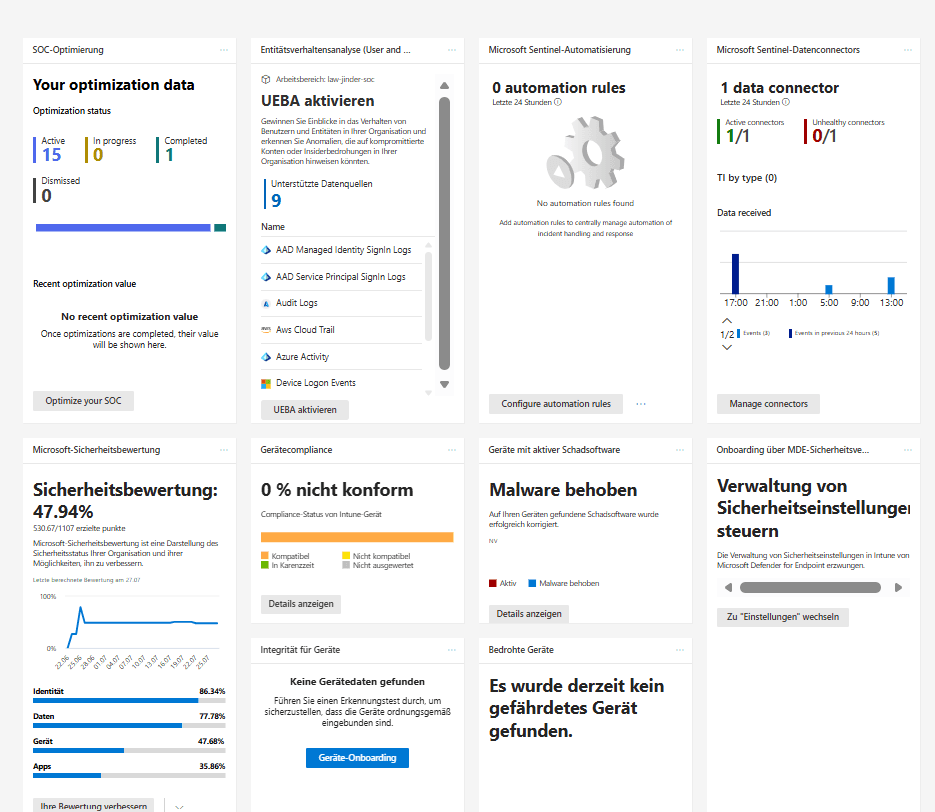
🔍 Key Observations
- The Microsoft Defender portal provides a unified security operations interface.
- Microsoft Sentinel and Microsoft Defender XDR are integrated within the same operational environment.
- Security posture, connected data sources and operational metrics are centrally displayed.
- The portal provides security teams with a consolidated view across multiple Microsoft security services.
- The unified interface supports monitoring, investigation and response activities.
Log Analytics workspace
The Log Analytics workspace provides the central repository for security telemetry collected by Microsoft Sentinel. Ingested events are indexed and retained within the workspace for querying, analysis and investigation.
The workspace LAW-Jinder-SOC is deployed in the Germany West Central Azure region and forms the data foundation of the monitoring environment.
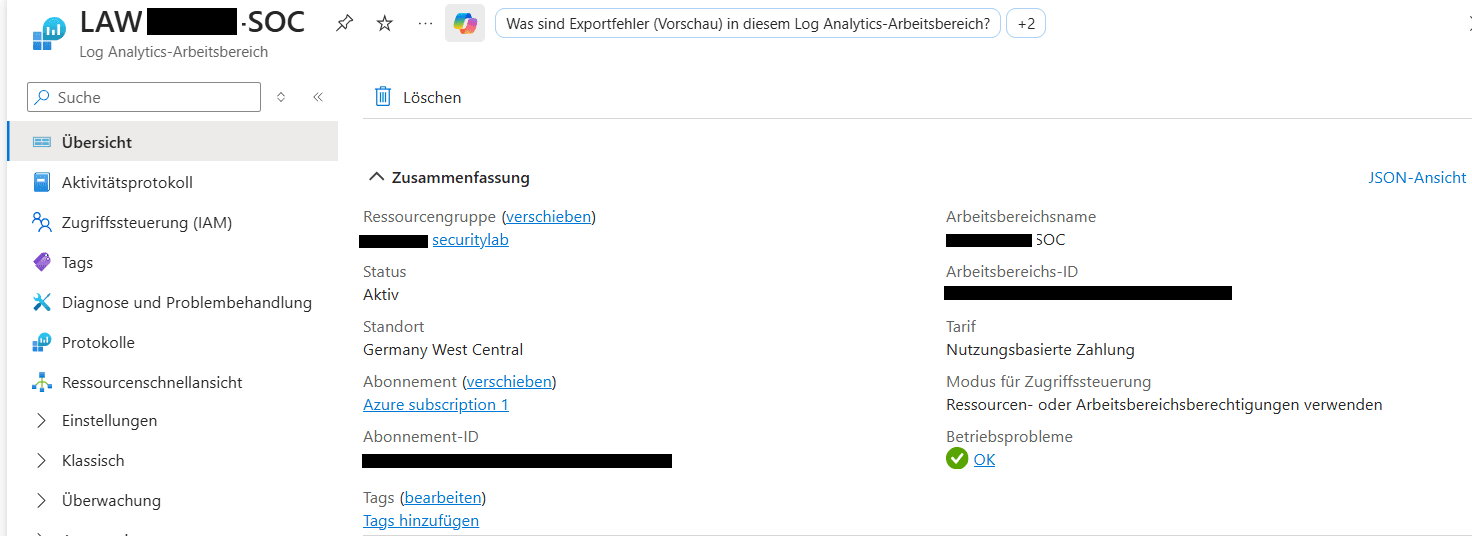
🔍 Key Observations
- The Log Analytics workspace serves as the central repository for security telemetry.
- Microsoft Sentinel stores and queries security events using the workspace.
- Collected logs support threat hunting, analytics and incident investigation.
- The workspace enables centralized retention and management of security data.
- Log Analytics forms the data foundation for the monitoring and detection capabilities.
Microsoft Sentinel data connectors
Data connectors integrate Microsoft security services and other supported data sources with Microsoft Sentinel. Each connector defines how security telemetry is collected and transferred into the Log Analytics workspace.
The Microsoft Entra ID connector provides identity-related telemetry, including sign-in events and directory audit logs.
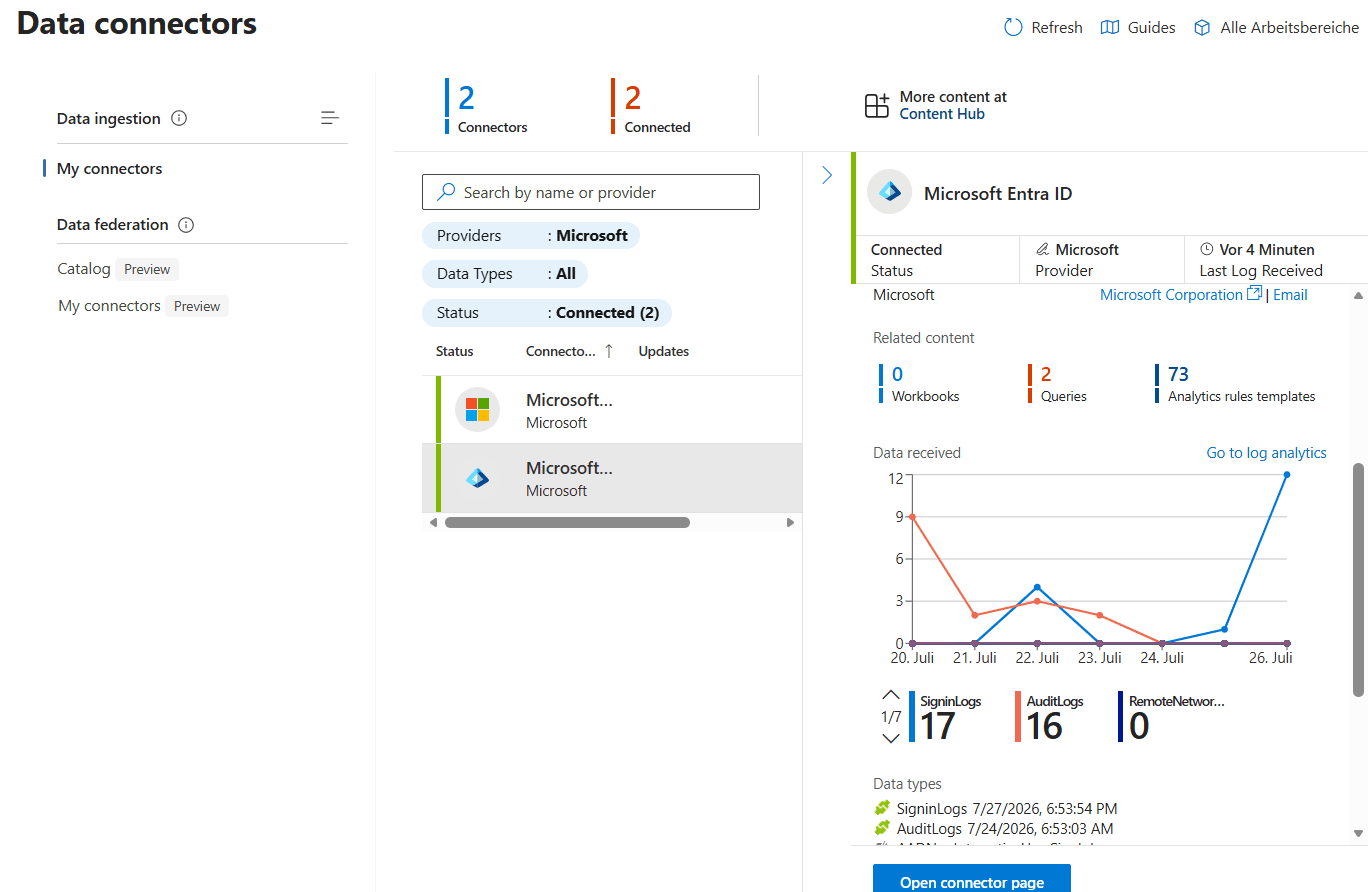
🔍 Key Observations
- Microsoft Sentinel receives security telemetry through connected data connectors.
- The Microsoft Entra ID connector provides identity-related security events.
- Sign-in logs and audit logs are continuously ingested into the Log Analytics workspace.
- Connected data sources provide the foundation for KQL queries, analytics rules and incident generation.
- Centralized data collection enables correlation across multiple Microsoft security services.
KQL threat hunting
The Kusto Query Language enables analysts to interactively search, filter and correlate security telemetry stored in Log Analytics. Queries can be used for threat hunting, incident investigation, reporting and detection engineering.
The example query retrieves the most recent Microsoft Entra ID sign-in events from the SigninLogs table.
SigninLogs
| sort by TimeGenerated desc
| take 20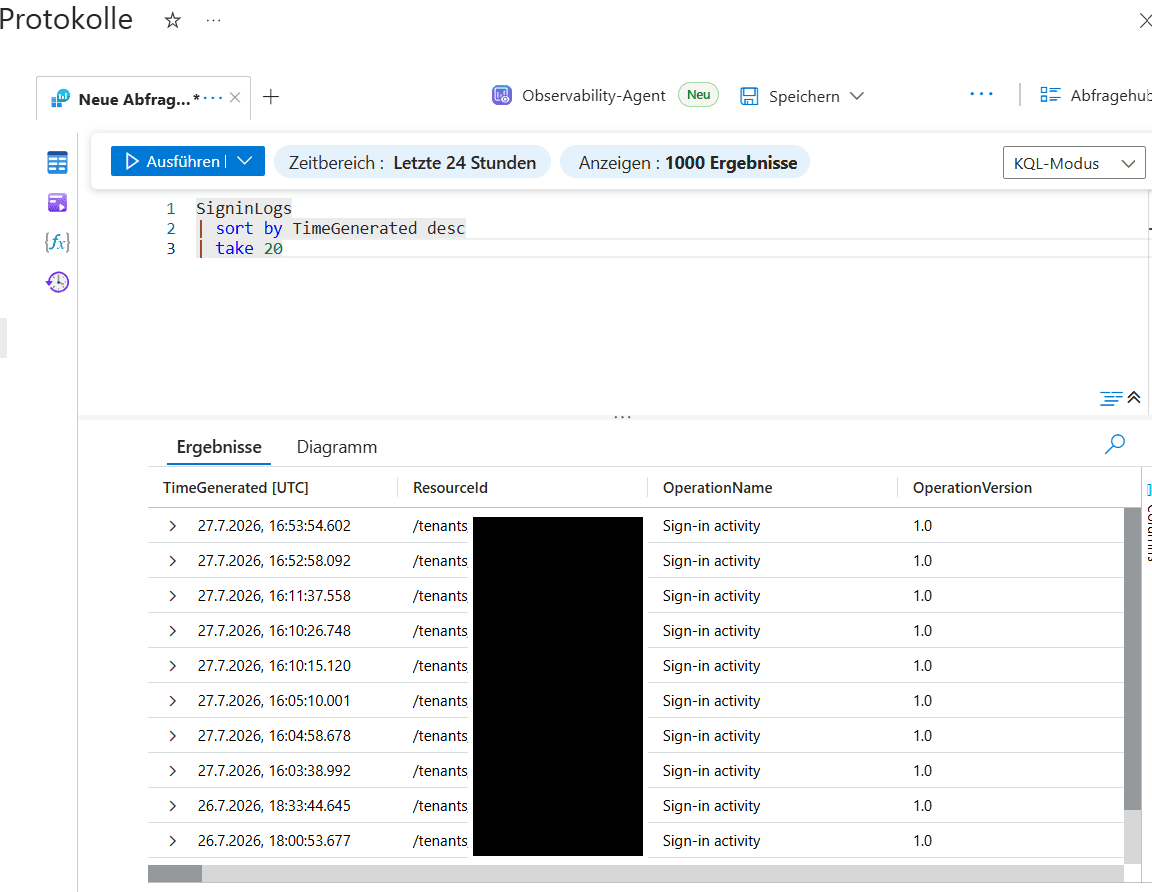
🔍 Key Observations
- Microsoft Sentinel uses KQL for interactive security investigations.
- Sign-in events can be queried directly from the Log Analytics workspace.
- Analysts can investigate authentication activity using flexible search and filtering capabilities.
- KQL enables rapid threat hunting across large volumes of security telemetry.
- Query results provide the foundation for developing analytics rules and security detections.
Analytics rules
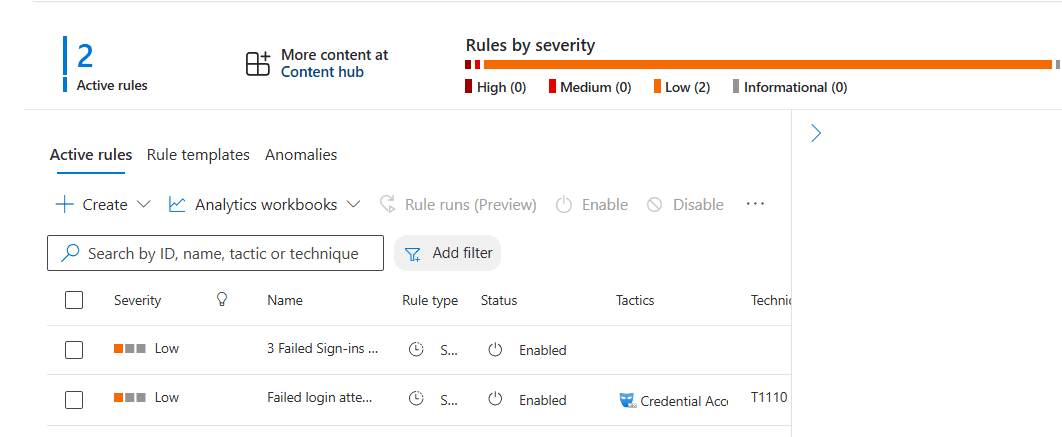
Analytics rules convert security telemetry into automated detections. Each rule contains detection logic that evaluates incoming events and identifies behavior matching defined threat conditions.
The active rules within Brunner Security Labs detect repeated failed sign-in attempts. The rules are enabled, assigned a severity and mapped to applicable MITRE ATT&CK techniques.
🔍 Key Observations
- Analytics rules continuously analyze incoming security telemetry.
- Detection logic is automatically executed as new events are ingested.
- Rules are classified by severity to support risk-based prioritization.
- Microsoft Sentinel maps detections to the MITRE ATT&CK framework.
- Triggered rules can generate alerts and incidents for investigation and response.
Incident management
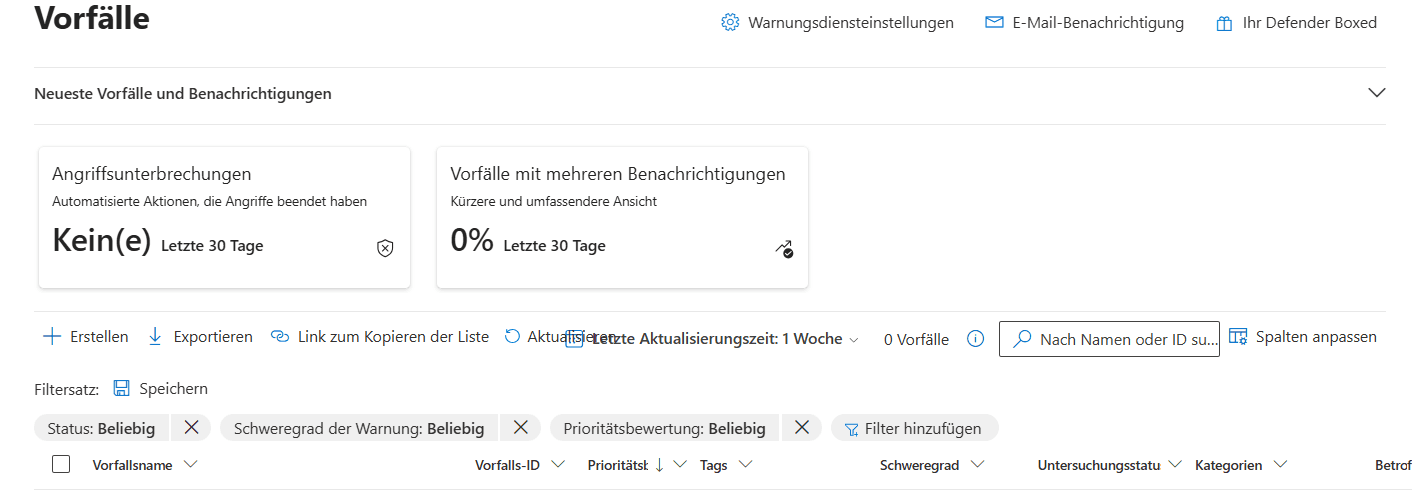
Alerts generated by Microsoft Sentinel and other Microsoft security services are consolidated within the Microsoft Defender incident queue.
Security analysts can use the incident queue to review severity, prioritize investigations, assign ownership and track the investigation status throughout the incident lifecycle.
🔍 Key Observations
- Microsoft Defender provides a centralized incident management interface.
- Security incidents can be created when analytics rules detect suspicious activity.
- Incidents are prioritized by severity to support efficient triage and investigation.
- The incident queue enables analysts to track the lifecycle of security investigations.
- Microsoft Defender unifies alerts from multiple Microsoft security services into a single operational view.
Validation
The monitoring architecture is validated through successful data ingestion, executable KQL queries, active analytics rules and visibility within the Microsoft Defender incident management interface.
- The Microsoft Defender portal displays the integrated security operations environment.
- The LAW-Jinder-SOC Log Analytics workspace is active and operational.
- Microsoft Sentinel data connectors report a connected state.
- Microsoft Entra ID sign-in and audit logs are received by the workspace.
- KQL queries successfully return authentication events from the SigninLogs table.
- Analytics rules for failed sign-in activity are enabled.
- Active detection rules are assigned a severity and MITRE ATT&CK mapping.
- The Microsoft Defender incident queue is available for incident triage and investigation.
Validation result
Identity telemetry is successfully ingested into Log Analytics, available for KQL analysis and continuously evaluated by active Microsoft Sentinel analytics rules.
Future Work
Future phases will expand telemetry coverage, detection engineering, incident generation and automated response capabilities.
- Connect additional Microsoft Defender XDR data sources
- Develop additional KQL hunting queries for suspicious sign-in behavior
- Create detections for impossible travel and unfamiliar locations
- Implement detections for disabled users and privilege changes
- Configure incidents to group related alerts automatically
- Test analytics rules by generating controlled security events
- Create Microsoft Sentinel automation rules and playbooks
- Configure incident notifications and analyst assignments
- Develop operational workbooks and SOC dashboards
- Integrate the monitoring workflow with the Incident Response and DFIR chapter