Overview
Endpoints are a primary target for malware, credential theft, ransomware and unauthorized access. They also represent the point at which users interact directly with enterprise data and cloud services.
Brunner Security Labs uses Microsoft Intune to manage Windows endpoints and Microsoft Defender for Endpoint to provide endpoint protection, security posture visibility and endpoint detection and response capabilities.
The endpoint security architecture combines centralized device management, compliance evaluation, disk encryption, malware protection, security hardening and continuous endpoint monitoring.
Business Need
Modern endpoints frequently operate outside a traditional corporate network. Users may access enterprise services from home networks, public networks or other remote locations.
Security controls must therefore remain effective regardless of the physical location of the device. Centralized management helps ensure that endpoints maintain an approved security configuration and continuously report their current protection and compliance status.
Endpoint security must also provide visibility into vulnerabilities, configuration weaknesses and suspicious activity so that security teams can prioritize remediation and respond to potential threats.
Security objective
Ensure that managed endpoints are securely configured, encrypted, monitored and protected against malware, unauthorized access and endpoint-based attacks.
Architecture
Microsoft Entra ID establishes the identity of the Windows endpoint. Microsoft Intune then manages its configuration, compliance state and endpoint security policies.
Microsoft Defender for Endpoint extends this architecture with endpoint security telemetry, exposure management, security recommendations, detection and incident-response capabilities.
Security status and endpoint telemetry are reported back to the Microsoft cloud services. This enables centralized administration, compliance validation, exposure assessment and investigation of endpoint security events.
Implementation
Microsoft Intune environment
Microsoft Intune provides the central platform for managing the Windows endpoint. It supports device enrollment, configuration management, compliance evaluation, application deployment and endpoint security policy administration.
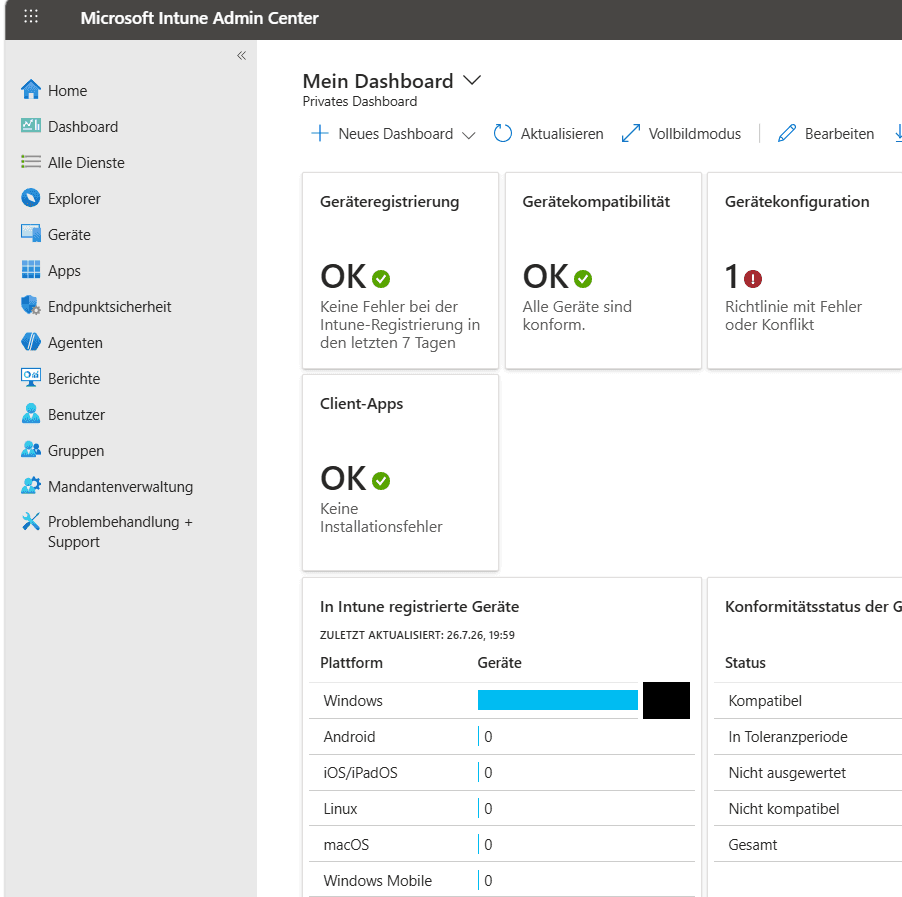
🔍 Key Observations
- Microsoft Intune serves as the central endpoint management platform.
- Managed Windows devices are administered through a single cloud-based console.
- Device compliance, configuration profiles and endpoint security policies are centrally deployed and monitored.
- Endpoint management is integrated with Microsoft Entra ID and Microsoft Defender for Endpoint.
- The dashboard provides administrators with an operational overview of the endpoint management environment.
Managed endpoint inventory
The Windows lab endpoint is enrolled in Microsoft Intune and associated with its Microsoft Entra device identity. Intune maintains a centralized inventory containing ownership, operating-system, management and compliance information.
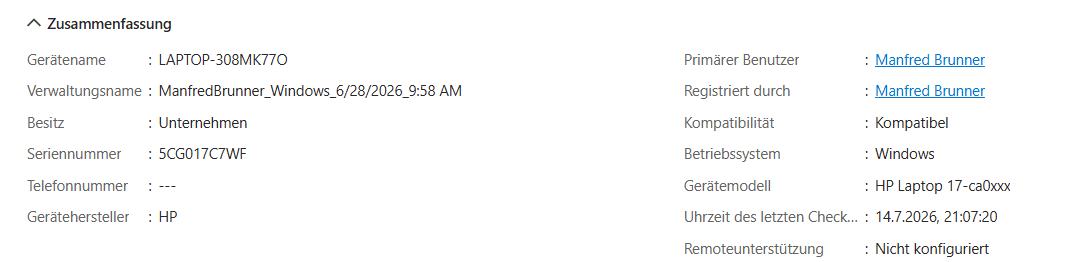
🔍 Key Observations
- Microsoft Intune maintains a centralized inventory of managed Windows endpoints.
- The device is managed as a corporate-owned endpoint.
- Microsoft Intune continuously reports the compliance status of the device.
- Centralized device inventory provides administrators with operational visibility into managed endpoints.
- Device inventory forms the basis for configuration management, compliance evaluation and endpoint security.
Device compliance
Compliance policies define the security requirements that managed Windows devices must satisfy. Microsoft Intune evaluates device state against these requirements and reports whether the endpoint is compliant.
Compliance information can also support Zero Trust access decisions when integrated with Microsoft Entra Conditional Access.

🔍 Key Observations
- Microsoft Intune centrally defines compliance requirements for managed Windows devices.
- Compliance policies evaluate whether devices satisfy organizational security requirements.
- Windows compliance policies support consistent security governance across managed endpoints.
- Compliance results can be integrated with Conditional Access to restrict access from noncompliant devices.
- Compliance policies provide measurable evidence that endpoint security requirements are enforced.
BitLocker disk encryption
BitLocker protects data stored on the Windows endpoint by encrypting the operating-system drive. Encryption reduces the risk of data exposure if the device is lost, stolen or accessed offline by an unauthorized person.
The BitLocker policy is centrally configured and assigned through Microsoft Intune, helping ensure that encryption requirements are applied consistently.
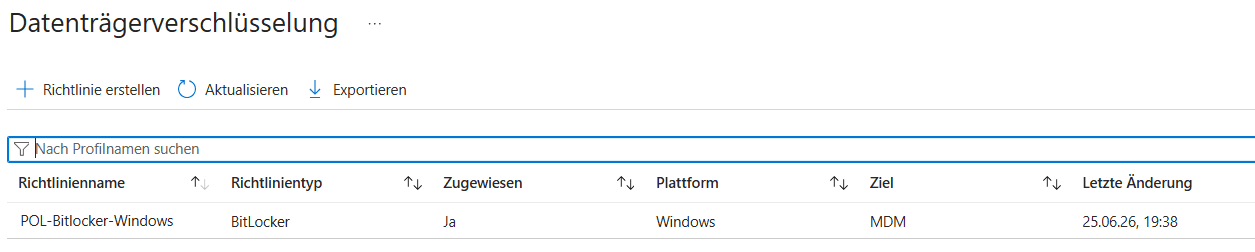
🔍 Key Observations
- Microsoft Intune centrally manages BitLocker encryption policies.
- The BitLocker policy is assigned to managed Windows devices.
- Central policy deployment ensures consistent disk encryption settings across the environment.
- BitLocker protects sensitive information stored on endpoint devices against unauthorized offline access.
- Disk encryption forms an essential component of endpoint hardening and data-at-rest protection.
Microsoft Defender Antivirus
Microsoft Defender Antivirus provides preventive protection against malware and potentially unwanted applications. Antivirus configuration and deployment status are centrally managed through Microsoft Intune.
The Antivirus dashboard also provides operational visibility into active malware, unhealthy endpoints, pending updates and policy deployment.
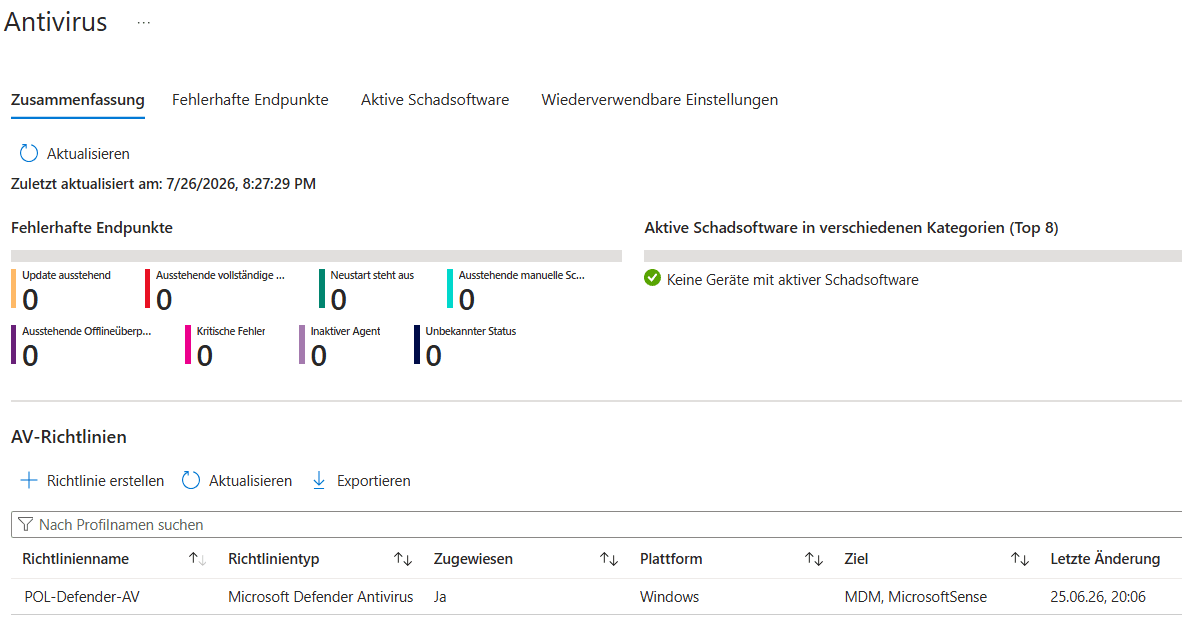
🔍 Key Observations
- Microsoft Defender Antivirus is centrally managed through Microsoft Intune.
- Antivirus policies are assigned to managed Windows endpoints.
- No active malware is currently detected within the managed environment.
- Endpoint protection status can be monitored from a centralized administrative console.
- Microsoft Defender Antivirus contributes to preventive endpoint protection as part of the overall defense-in-depth strategy.
Microsoft security baselines
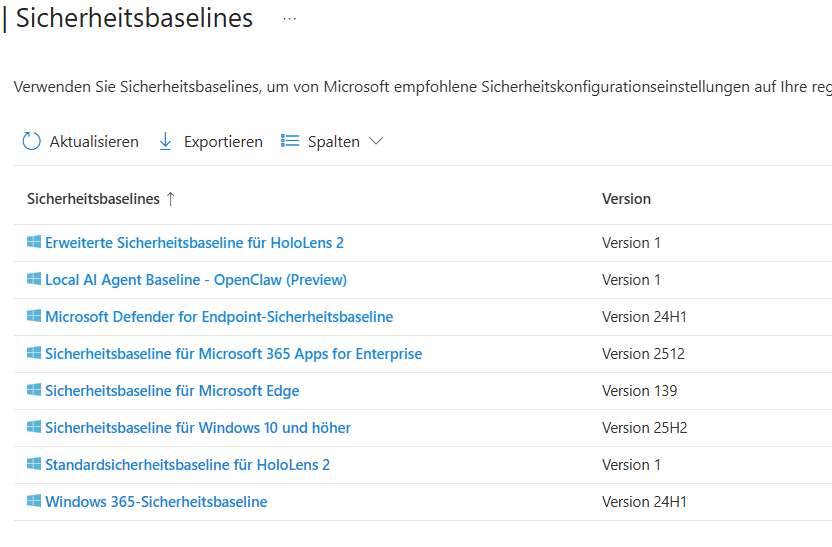
Microsoft Intune provides predefined security baselines that contain recommended security settings for Windows, Microsoft Edge, Microsoft Defender for Endpoint and other Microsoft platforms.
These baselines can simplify endpoint hardening and help organizations establish consistent security configurations. Security baseline deployment has not yet been completed within Brunner Security Labs and remains a planned enhancement.
🔍 Key Observations
- Microsoft Intune includes predefined security baselines for multiple Microsoft platforms.
- Security baselines simplify the implementation of Microsoft's recommended security settings.
- Baselines help establish a consistent security configuration across managed endpoints.
- Organizations can customize baseline settings to meet their security requirements.
- Security baselines reduce deployment effort and support standardized endpoint hardening.
Planned implementation
The Windows Security Baseline will be evaluated and deployed in a future phase after compatibility testing, policy review and validation on the managed lab endpoint.
Microsoft Defender for Endpoint
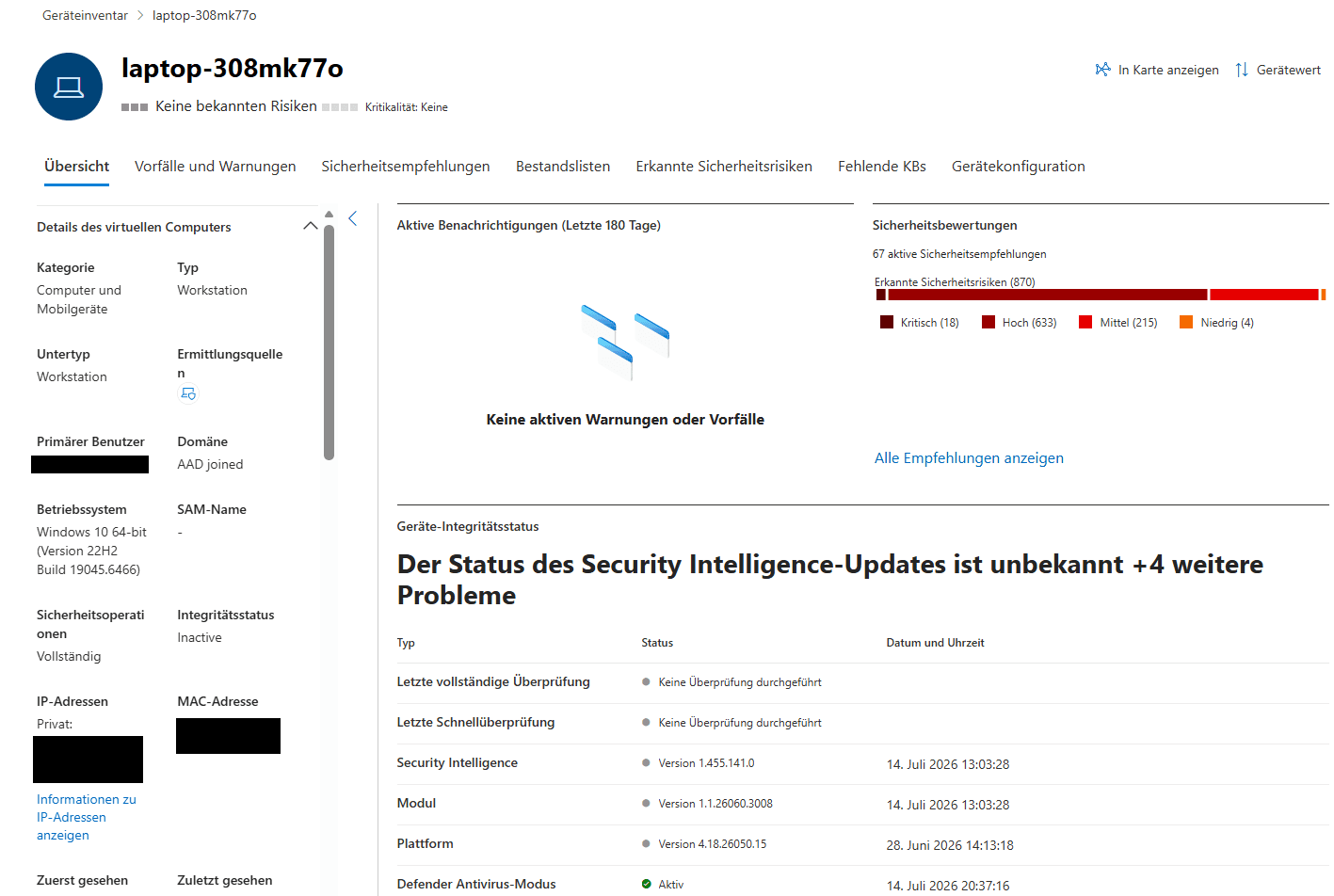
The Windows endpoint is onboarded to Microsoft Defender for Endpoint. The platform provides endpoint security telemetry, device health information, exposure visibility, security recommendations and endpoint detection and response capabilities.
The device overview consolidates protection status and security posture information in a single interface, supporting continuous monitoring and prioritized remediation.
🔍 Key Observations
- Microsoft Defender for Endpoint continuously monitors the security posture of managed endpoints.
- The device overview consolidates operating system information, security status and endpoint health in a single interface.
- Security recommendations help administrators prioritize hardening activities and reduce the attack surface.
- The platform provides the foundation for endpoint detection, investigation and incident response.
- Device telemetry supports continuous monitoring and proactive security operations.
Validation
Endpoint controls are validated through Intune device records, compliance results, policy assignment status and Microsoft Defender for Endpoint telemetry.
- The Windows endpoint appears in Microsoft Intune.
- The device is classified as corporate-owned.
- The endpoint reports a compliant device state.
- A BitLocker encryption policy is assigned.
- A Microsoft Defender Antivirus policy is assigned.
- No active malware is reported in the Intune dashboard.
- The device reports security information to Microsoft Defender for Endpoint.
- Defender for Endpoint provides security recommendations and exposure information for the managed device.
Validation result
The Windows lab endpoint is centrally managed, compliant, protected by assigned endpoint security policies and visible within Microsoft Defender for Endpoint.
Future Work
The next stage will expand endpoint hardening and response capabilities through additional Microsoft security controls and operational testing.
- Deploy and validate the Windows Security Baseline
- Configure Attack Surface Reduction rules
- Implement a dedicated Microsoft Defender Firewall policy
- Evaluate Microsoft LAPS
- Evaluate Endpoint Privilege Management
- Configure removable-storage and USB device control
- Validate Tamper Protection
- Test automated investigation and remediation
- Exercise Defender Live Response